Echo Bravo

Vintage slap for the modern era.

Echo Bravo plugin
$59 Get Echo Bravo Hear it
Hear It

Dry. Then slapped.

Echo Bravo — Audio Demo
0:00 / 0:44
Echo Bravo

A vintage slap delay with a pompadour.

Slap-back is the sound of the records your favorite records were copying. Echo Bravo puts it in the hands of a greaser who's no square. All strut. Never misses the pocket.

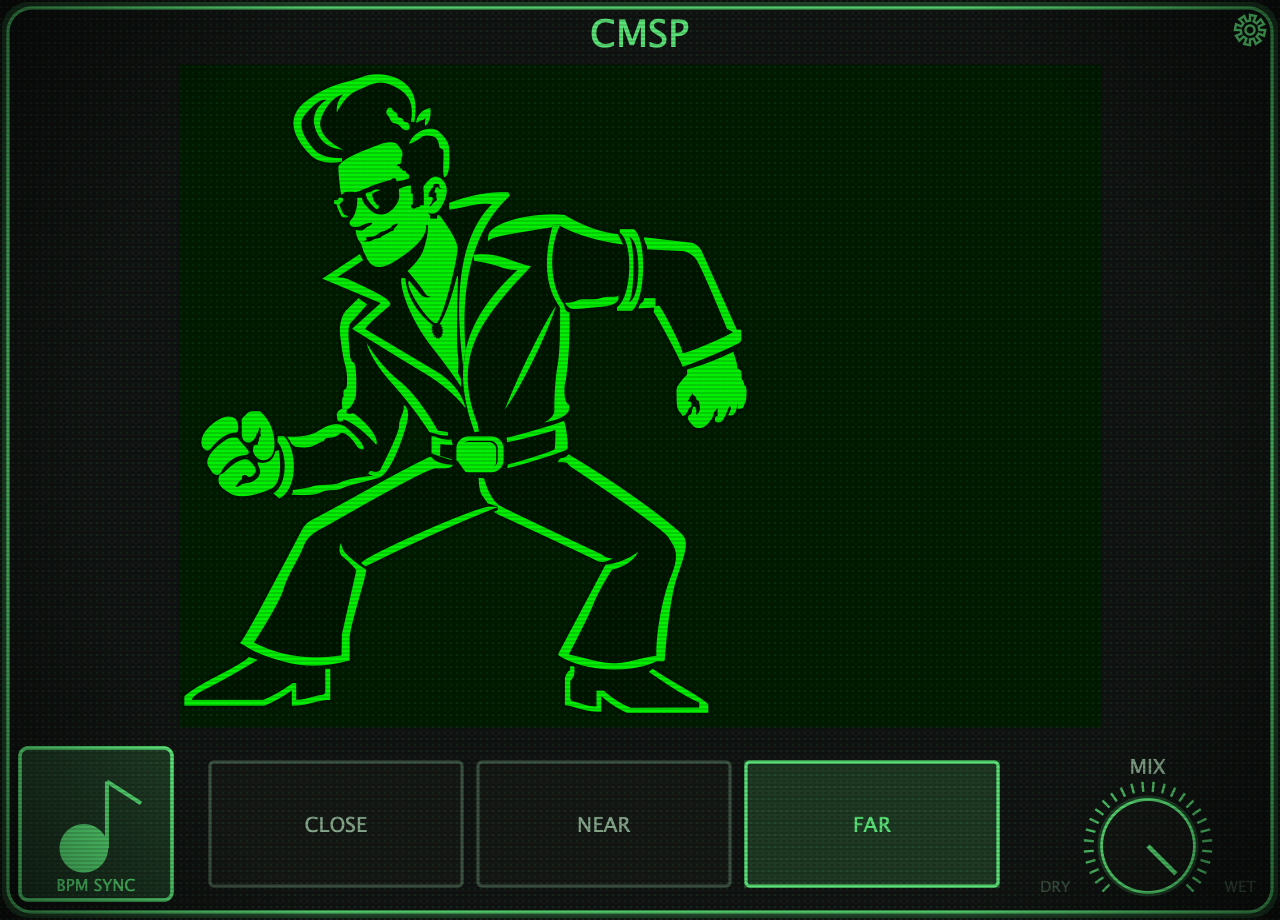
No knobs to hunt. Click his hair and the saturation climbs. Click his body and the repeats stack up behind him — you can watch them trail off. Click his belt buckle and he shimmies, and the perspective shifts. Lock him to your tempo or set him by ear. Forget how any of it works? Hit the gear. He'll remind you.

Origin

Built in the Room.

Create
Music
Group
Create Music Studios
Los Angeles, CA

Echo Bravo came out of real sessions. The engineering team at Create Music Group and Create Music Studios wanted slap-back that felt like a performance, not a settings page. So we built a greaser and let him run it.

Built for our sessions. Released for yours.

What it does

The greaser

The Hair: saturation.

Each click adds more: 25, 50, 75, 100%. The fifth click takes it back to clean.

The Body: repeats.

Each click stacks another repeat behind him, up to three. You can watch them trail off. The fourth click takes it back to a single slap.

The Belt Buckle: positioning.

Click and he shimmies, and the perspective shifts.

Timing

BPM SYNC on: pick CLOSE, NEAR or FAR. All three lock to your session tempo.

BPM SYNC off: set him by ear. Click or drag the time bar.

Either way, he stays in slap territory: 30 to 140 ms.

MIX: drag up for more slap, down for more dry.
The gear

Forget how any of it works? Hit the gear. He'll remind you.

The how-to screen shows every time you open Echo Bravo. Tick don't show again to skip it. The gear still brings it back.

→ No knobs to hunt. Click the greaser.
Compatibility

Requirements

Mac
  • macOS 10.15 Catalina or later.
  • Universal (Intel and Apple Silicon).
  • VST3 · AU · AAX
Windows
  • Windows 10 or 11, 64-bit (x64).
  • VST3 · AAX
The basics
  • One license covers 3 computers.
  • No internet in the room? Click No internet? Activate offline.
  • Once activated, it works offline. It checks in online at least once every 90 days.
  • New machine? Free up a seat in your CMSP account.
  • No iLok, no dongle. Your CMSP account is the license.

Questions: Studios@createmusicgroup.com

Support

Questions.

Do I need an iLok?

No. No iLok, no dongle. Your CMSP account is the license.

Can I try it first?

Yes. 14 days, free, the full plugin. Nothing held back.

How many computers?

One license covers 3 computers. New machine? Free up a seat in your CMSP account.

Does it work offline?

Yes. Once activated, it works offline. It checks in online at least once every 90 days. No internet in the room at all? You can activate offline too.

Which formats?

Mac: VST3, AU and AAX, Universal (Intel and Apple Silicon). Windows: VST3 and AAX, 64-bit.

Does it run on Windows?

Yes. Windows 10 or 11, 64-bit (x64). VST3 and AAX.

Do I pay for updates?

No. It's a lifetime license. Updates are free.

Echo Bravo Full License · Mac & Windows $59 14-day free trial · Full plugin

Slap-back's where it's at.

Get Echo Bravo · $59

Your CMSP account is the license

◼VST3 · AU · AAX
◼Mac & Windows
◼Lifetime License
◼No iLok · No Dongle
◼14-Day Free Trial